If you are comparing meal planning apps, start with the job you need done: a weekly plan you can review, a grocery list you can shop from, and a way to record what actually got eaten. This guide is a buying and evaluation checklist for caregivers of young children. It is not a ranked “best meal planning app” list, and it does not claim one product is best for every household.
Disclosure: This article is written by the MealSprout Team. MealSprout is used as a worked public example of a family meal planning app for ages 6 months through 5 years. Features and prices were checked on public pages on September 26, 2026. This is not an independent hands-on trial of a live generated week, and it is not clinical or nutrition advice.
What a meal planning app usually means
Most “meal planning app” searches are looking for software that turns “what’s for dinner?” into a reviewable plan plus shopping support. A recipe library alone is not the same thing as a planning system. For families with babies and toddlers, useful evaluation questions go further: Does each child get a separate profile? Can you see breakfast, lunch, and dinner for the week? Does feedback change later suggestions? What happens at the end of a trial?
MealSprout’s public positioning is narrow on purpose: child profiles from 6 months through 5 years, AI-assisted selection from a fixed recipe collection, grocery lists per child’s plan, and saved meal feedback. That scope is different from general household planners aimed at adult dinner rotation. Keep that difference in mind when you compare tools.
Family meal planning app evaluation checklist
Use these questions during a trial week. Answer them against the live product in front of you, not against marketing copy alone.
| Check | Why it matters | Question to ask |
|---|---|---|
| Child profiles | Ages, textures, and filters should be reviewable per child | Can each child have a separate profile with age, texture settings, and allergy filters? |
| Plan review | You still decide what to cook | Can I open breakfast, lunch, and dinner for the week and read ingredients before I commit? |
| Recipe detail | Shopping and safety checks need full ingredients | Does each meal open to ingredients, preparation, and texture notes? |
| Grocery list | A plan without shopping support still leaves work | Is there a list grouped by category that I can take along or print? |
| Swaps | Busy weeks need a replacement path | Can I request a replacement meal without rebuilding the whole week? |
| Feedback loop | Preferences change; records should inform later picks | Can I save Loved / Ate some / Nope (or equivalent) after a meal? |
| Multi-child shopping | Sibling plans may not auto-merge | Are grocery lists separate per child, and do I need to combine overlaps myself? |
| Allergy filters | Filters guide selection; they are not a safety certificate | Does the product say filters cannot guarantee a meal is safe? |
| Trial and renewal | Card and auto-renewal terms affect cost | Is a card required? When does billing start if I do not cancel? |
| Usage limits | Generations may be temporarily limited | Are the same tools available in trial and paid tiers, with stated usage limits? |
Worked example: MealSprout’s public planning and feedback workflow
The public product walkthrough on mealsprout.app describes this loop:
- Child profile. Age, texture settings, and allergy filters help shape recipe selection. Add a separate profile for each child.
- Weekly meal plan. Breakfast, lunch, and dinner are laid out for review. Optional snacks are included in the trial and paid feature tables on pricing, with usage limits.
- Recipe detail. Open a meal for ingredients, preparation, and texture notes. Always check labels and cross-contact before serving.
- Grocery list. Ingredients are grouped by category. Review quantities in the recipes, then take the list along or print it.
- Swap and feedback. Request a replacement with the swap control when needed. After meals, record Loved it, Ate some, or Nope. Saved responses help inform future recipe selections; they do not guarantee a child will accept a food.
MealSprout uses AI to select from its recipe collection based on the child profile and saved meal feedback. You review the suggestions and decide what to prepare. Per Terms of Service (updated September 5, 2026), AI output can contain errors or omissions, and MealSprout is not medical or dietetic advice.
Labeled sample from public marketing screens
The homepage carousel caption states that the images are “Actual MealSprout screens with a fictional family and sample plan.” That is a labeled fictional-family sample from public marketing screens, not a live trial capture of a full generated week.
Visual inspection of the public assets today-mobile.png and today.png (linked from the homepage) shows a fictional household with child tabs Avery (selected) and Riley. Avery’s profile card on the desktop screen shows age 24 months, a “REGULAR” badge, and “No allergies.” The day card for Monday, September 7 includes:
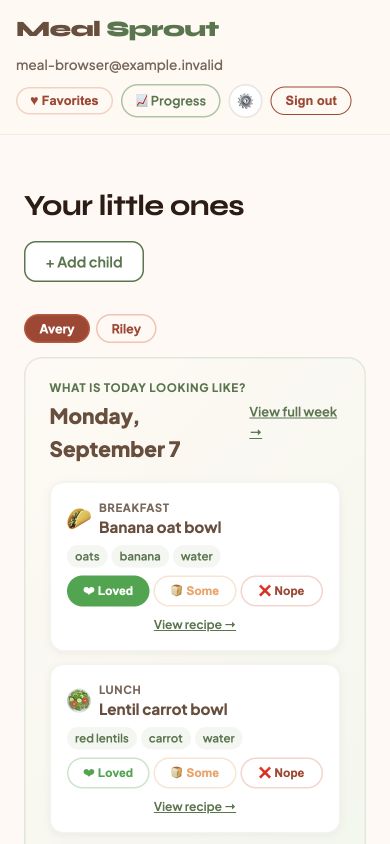
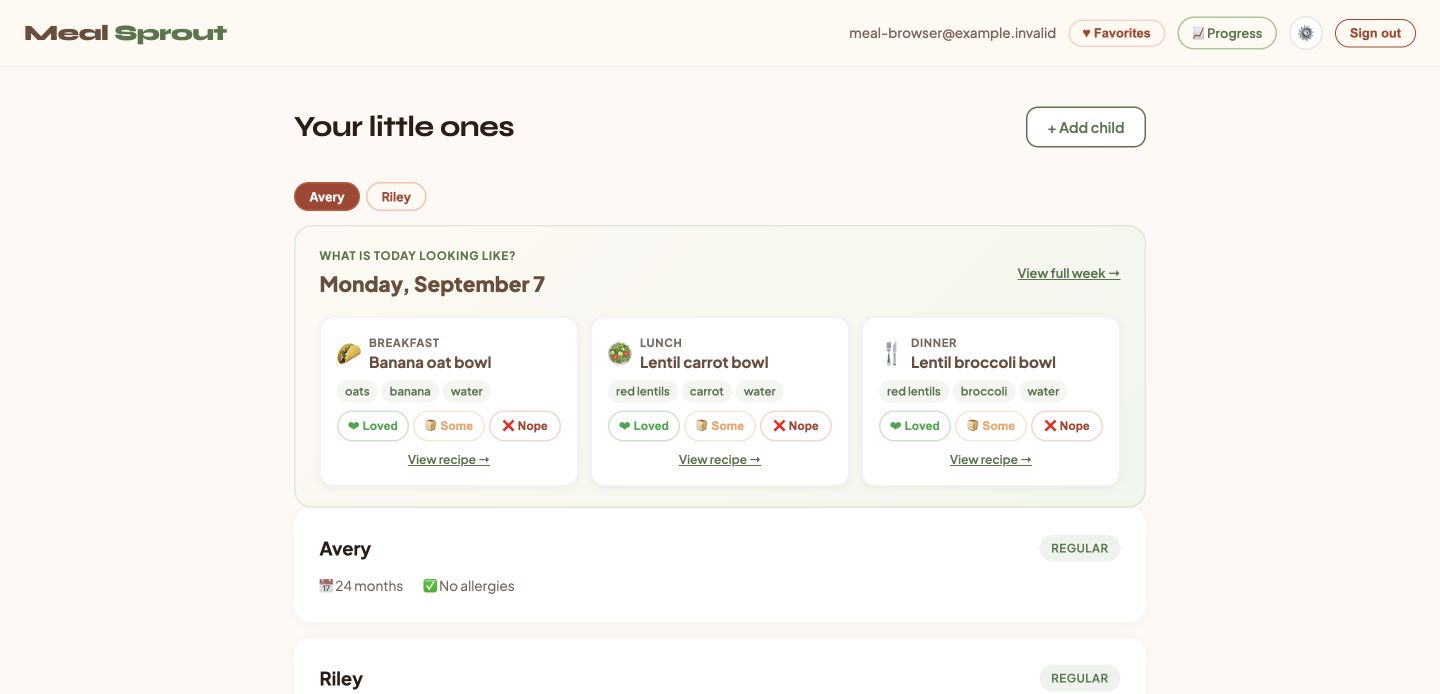
- Breakfast: Banana oat bowl — ingredient chips oats, banana, water
- Lunch: Lentil carrot bowl — red lentils, carrot, water
- Dinner (visible on the desktop overview): Lentil broccoli bowl — red lentils, broccoli, water
Each meal card shows feedback controls labeled Loved, Some, and Nope, plus a “View recipe” link. The mobile asset also shows a “View full week” control. This summary matches those public images; it is not a full weekly plan from a live trial.
Multi-child plans and grocery lists
MealSprout supports multiple child profiles and separate plans in one account. Each child’s plan has its own grocery list. The app does not currently promise one automatically merged cross-child grocery list. If you need shared cooking with texture adaptations across ages, use the manual workflow in multi-child meal planning and combine overlapping ingredients yourself.
Current MealSprout trial and subscription terms
Rechecked on mealsprout.app/pricing on September 26, 2026 (USD):
- New subscribers get a seven-day trial that requires a confirmed card.
- Your selected subscription renews automatically unless you cancel before the trial ends.
- Monthly: USD $4.99. Annual: USD $39.99 (twelve monthly payments would total USD $59.88).
- The same planning tools are available during the trial and paid subscription. Generation is subject to usage limits; requests may be temporarily limited.
- Monthly plans can be cancelled anytime; you keep access until the end of the paid period. Annual plans are billed once per year; pricing states there are no partial refunds, with access for the full year.
Before you subscribe, confirm the current price, card requirement and automatic renewal terms on the live pricing page and in the terms. Start a trial from signup only if those terms fit your household.
When a different MealSprout guide is the better next click
- For a named competitor workflow comparison with Solid Starts, read Solid Starts alternative.
- For shared dinners and manual multi-child prep, use multi-child meal planning.
- For paper menu examples by age, see the toddler meal plan, 1-year-old meal plan, BLW starter meal plan, or 5-year-old meal plan.
- For acceptance and flexibility ideas without software ranking, see picky toddler dinner ideas and toddler meal prep.
FAQ
Do I need a meal planning app?
No. A written plan can work. Use an app when you want recurring weekly selection, per-child filters, a grocery list, and a place to save how meals went. Test that loop in a trial week before paying.
What should I test in a trial week?
Build or open a child profile, review a week of meals, open at least one full recipe, check the grocery list, try a swap, and save feedback after a real meal. Confirm card, renewal, and cancellation steps on the current pricing page.
Can allergy filters guarantee a meal is safe?
No. Profile allergy filters help exclude matching ingredients. Always check each recipe, product label, and cross-contact risk before serving. Automated filters cannot guarantee safety. Follow qualified clinical advice about allergies and introducing foods.
Does meal feedback guarantee better nutrition or acceptance?
No. Saved feedback is described as informing future recipe selections. It does not guarantee acceptance, and MealSprout is not a clinical nutrition service.
Where can I read data and AI disclosures?
See the Privacy Policy and the AI output section of the Terms of Service. Relevant meal feedback and related recipe information may be processed by AI providers to personalize selections. MealSprout states personal data is not sold.
Sources and editorial notes
Primary public sources accessed September 26, 2026: MealSprout home, pricing, terms, privacy, signup, and the labeled marketing screens today-mobile.png and today.png. Adjacent MealSprout guides linked above were checked as live pages on the same date. Written by the MealSprout Team. General product-evaluation information only; not individualized medical or nutrition advice.